

- Home
- Works & Tech
- Still Arranging Logos by Hand for Your Proposals? Work Smarter with the Free Tool "Logo Naraberu-kun"
Tech Articles
Still Arranging Logos by Hand for Your Proposals? Work Smarter with the Free Tool "Logo Naraberu-kun"
We've released "Logo Naraberu-kun"!
Hello from World Area Networks Co., Ltd.
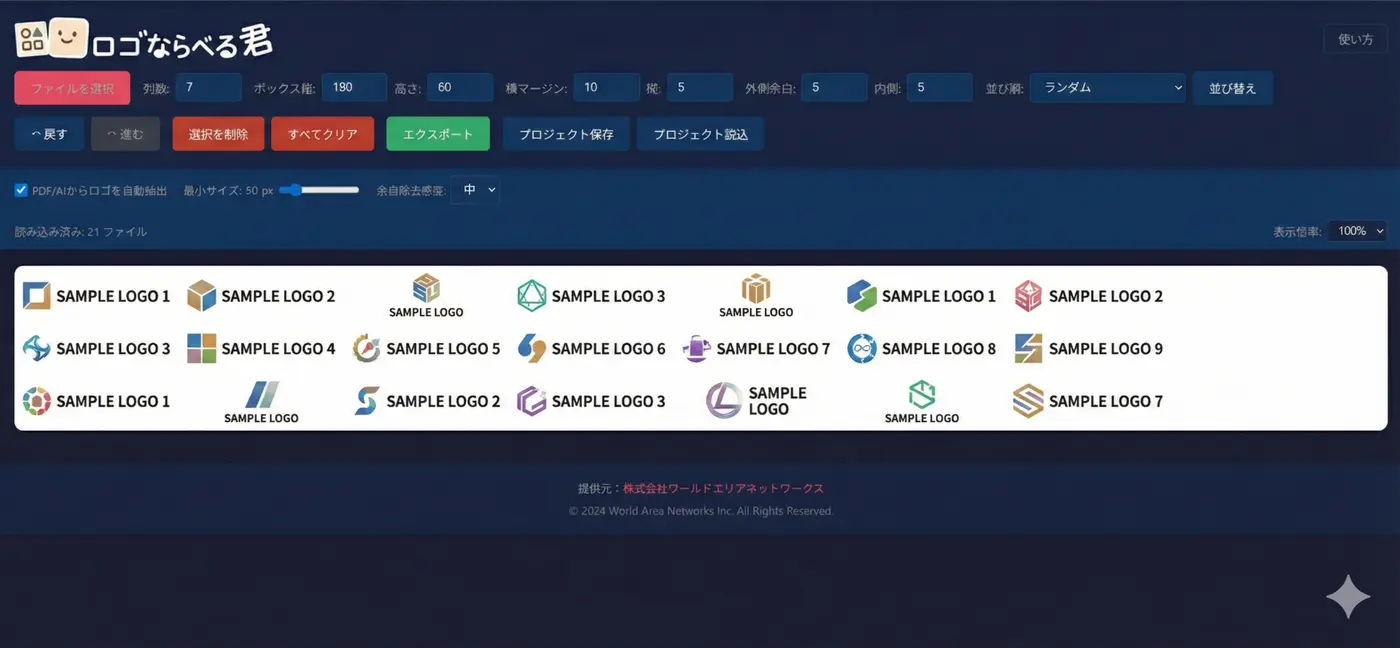
We have released "Logo Naraberu-kun," a free web tool that lets you easily arrange multiple logos and export them as images or PDFs.
Do any of these sound familiar?
- You want to include a "list of client logos" in a proposal, but arranging them is a hassle...
- Lining up sponsor logos for an event takes time every single time
- In lists of exhibitors at trade shows, the logos are all different sizes and look messy
- The logos you receive from clients are in PDF or AI format and are hard to use as images
- When you arrange logos in PowerPoint, the sizes and spacing end up inconsistent
- Remaking the list every time more companies join is a pain "Logo Naraberu-kun" solves all of these problems!
Main features
- Easy drag-and-drop import Supports not only PNG and JPEG but also PDF and AI files. You can import logo data received from companies as is.
- Auto-trimming Automatically detects and removes the margins around each logo. Inconsistent margins from different companies are unified, so you can create a clean-looking list.
- Flexible layout settings
- Number of columns (1–12)
- Box size (width and height)
- Spacing (horizontal and vertical gaps)
- Padding (outer and inner) It is also easy to vary sizes by sponsorship tier or adjust the layout to suit the publication medium.
- Reorder by dragging You can freely change the order of logos by drag and drop. Sort them to suit your purpose, such as by sponsorship amount or in Japanese syllabary order. Sorting by file name or randomly is also just one click away.
- Export in multiple formats Supports PNG / JPG / PDF. You can also choose the output scale (1x / 2x / 3x), so it works for both print and the web.
- Easy to add and revise Even when more companies join, just drop in the additional files. Save your work in progress with the project save feature, and making changes later is a breeze.
Examples of use for sponsor and participating company logos
List of sponsors for an event or seminar
Challenge: The logos of 50 sponsors need to be arranged, but the logo formats received from each company vary (a mix of PNG, PDF, and AI). Neither the sizes nor the margins are
consistent.
Solution: Drop all the files into "Logo Naraberu-kun" → unify the margins with auto-trimming → sort by sponsorship tier →
export as PDF and submit to the printing company
Result: A task that used to take 2–3 hours was completed in 30 minutes
List of exhibitors at a trade show
Challenge: You want to publish a list of 100 exhibitors' logos on both the website and the venue panels.
Solution:
- For the web: Adjust the number of columns for a wide layout → export as PNG
- For panels: Export as a high-resolution (3x) PDF Point: You can export multiple patterns from the same project, so there is no need to remake the list for each medium
List of member companies of an industry association
Challenge: The list needs to be updated every time a member company joins or leaves.
Solution:
Just save the project, and when there are changes, add or remove logos and export again. There is also an Undo/Redo feature, so you don't have to worry about mistakes.
Secure and reliable
"Logo Naraberu-kun" runs entirely in your browser.
- No data is ever sent to a server
- Images you import are not sent anywhere outside
- No user registration required Company logos may sometimes involve confidential information, but you can use the tool with peace of mind.
Other use cases
| Scene | Example use |
|---|---|
| Sales materials | List of logos of business partners and client companies |
| Portfolio | List of logos of clients you have worked for |
| Recruitment website | Logos of partner companies and group companies |
| Press releases | Logos of partner and participating companies |
| Website | Logos on customer testimonial and case study pages |
Free to use
"Logo Naraberu-kun" is completely free to use.
Give it a try when you create your next event's sponsor list!
▶ https://wan-hiroshima.jp/logo_naraberukun/
If you have any questions or requests, please feel free to contact us.