- Home
- Works & Tech
- 7 Tips to Avoid Failure When Building Your First Website
Tech ArticlesWeb
7 Tips to Avoid Failure When Building Your First Website

When it comes to building a website for the first time,
we often hear comments like "I don't know where to start" and
"I'd like to hire a company, but I don't know enough and I'm worried."
If you are going to invest time and money in a website, naturally you want to avoid failure.
In this article, we explain in plain terms "7 tips" to help website beginners avoid common mistakes.
Based on problems that have actually occurred during production and examples that failed to deliver results, we share the perspectives and guidelines for action you should keep in mind beforehand.
From a website that is "just built" to one that "delivers results."
Let's prepare together so you won't have regrets.
What are common website production failures?
The following "common failures" tend to occur in website production.
- Production proceeds with vague goals, and the content loses consistency
- Too much emphasis on looks results in a site that is hard to use
- Visitors leave because the site does not support smartphone display
- No operating structure is in place, so the site is left without updates
- Weak SEO means little search traffic can be expected
- Insufficient communication with the production company leads to a result that differs from what was envisioned
Many of these failures stem from insufficient preparation and a lack of knowledge.
Especially when building a site for the first time, it is essential not to leave everything to the vendor, but to have a clear policy of your own.
7 tips to avoid failure
1. Clarify the purpose of the website
Clearly define what you want to achieve with your website, such as "increasing inquiries," "supporting recruitment," or "raising brand awareness."
Once the purpose is set, the page structure and design direction will naturally fall into place.
2. Define personas (target users)
Writing down "who" you want to reach clarifies the tone and structure of your content.
- Age group
- Gender
- Industry and occupation
- Challenges they face
- Devices they commonly use
The key is to define these specifically.
3. Identify the pages you need
Using basic pages like the following as a base, consider what information your company needs.
- Top page
- Service overview
- Company profile
- Contact form
- Careers
- Case studies
It is important to create a structure that lets visitors smoothly find "what they want to know next."
4. Don't forget smartphone support (responsive design)
It is said that about 70% of web access comes from smartphones.
Even if a site looks beautiful on a PC, a broken layout on smartphones leads to users leaving.
Keep optimal display on all devices in mind from the production stage.
5. Prepare your content carefully in-house
A common misconception is that "the vendor will take care of all the text and photos."
However, the people who best understand your company's appeal and strengths are the people within your company.
- Providing materials for case studies
- Staff interviews
- Writing drafts describing your services, etc.
Work with the production company to co-create high-quality content.
6. Build a structure with SEO in mind
What search keywords do you want users to find you with?
With that in mind, it is important to plan the heading structure, writing, and URL structure.
Rather than adding SEO measures later, designing for SEO from the early stages is overwhelmingly more effective.
7. Decide on your operating structure after launch
A website is not "done once it's built"; it is "media you grow."
- Who will update it
- How often it will be updated
- Whether to outsource or handle it in-house
Keep post-launch operation in view and clarify your structure and schedule.
New website production case study
FVM Co., Ltd.
Challenge
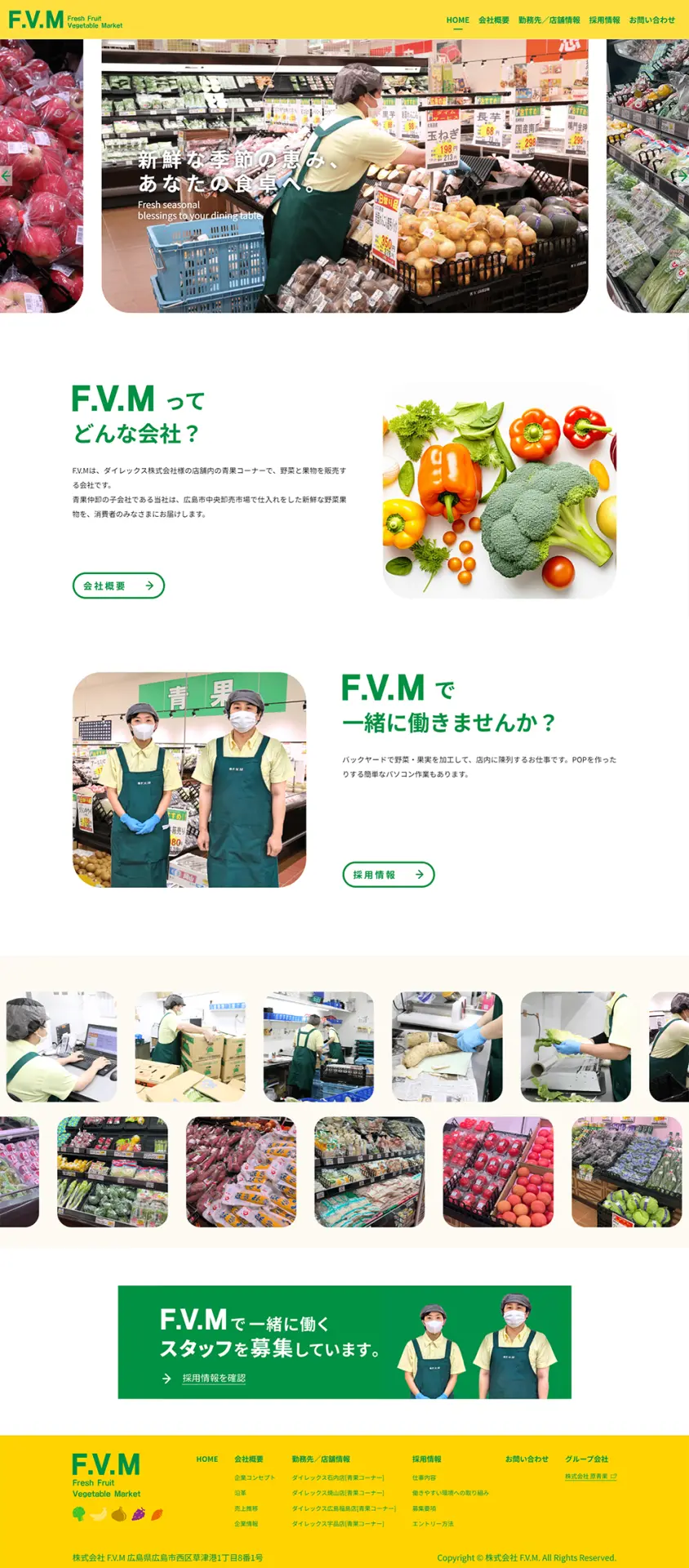
The client consulted us about creating a website with the aim of recruiting more people.
Measures
- Created a new corporate website presenting recruitment information in an easy-to-understand way
- Adopted fresh tones based on vitamin colors and a simple, visually clear layout, so that the site is designed to let users access information comfortably
- Featured photos that convey the atmosphere inside the company, working to convey the company's values and workplace atmosphere realistically
Key point
By structuring the site to carefully convey FVM's philosophy and work environment, we increased empathy among the target audience and contributed to stronger recruitment.
About maintenance
WAN previously created the website for Hara Seika Co., Ltd., the parent company affiliated with F.V.M,
and we also handle the maintenance of that site.
In addition to website production, WAN provides updates, security checks, and support when problems occur, helping clients run their websites with peace of mind.
👉 For details:
FVM Co., Ltd. website production case study (WAN)
Pitfalls to watch out for during production
You also need to watch out for "easily overlooked points" like the following.
- Additional costs arise because the estimate was not checked in detail
- Management rights for the server and domain are unclear
- The design is chosen simply because it "looks kind of cool"
To avoid these problems,
- Define requirements properly
- List the items to confirm before signing a contract
- Choose a vendor with a proven track record and trustworthiness
these steps are essential.
Summary
- Clarify the purpose and target of your website at the very beginning
- Persona design, smartphone support, and SEO are the most basic fundamentals
- For content preparation and the operating structure too, "your company's involvement" is the key to results
- Learn from successful cases and aim for steady design and construction
Consult World Area Networks
World Area Networks Co., Ltd. provides end-to-end support, from website strategy planning through production, operation, and customer acquisition measures.
If you have concerns about building your first website, such as "we don't have enough internal resources," "we're worried about updates after launch," or "we don't know where to start,"
please feel free to consult us.
▶ Click here for a free consultation or to download case study materials